
Free AI Tools for Students (2026): A Practical Stack for Research, Writing, and Studying—Without the Hype
I spent the last few days wrestling with this concept and here’s what stuck. I tried too many “free” study tools in one sitting, hit three different paywalls, and—because I’m me—ended up reading privacy pages at 1 a.m. in the Seattle drizzle.
Here’s my thesis: free AI tools for students are genuinely useful, but only if you treat “free” as a set of constraints (limits, exports, data policies) and build a small workflow instead of collecting apps like Pokémon. The rub is never the model; it’s the ceilings and the fine print.
TL;DR: the 3-tool stack (and the limits that actually matter)
- General chatbot (explanations + drafting): Gemini
Best for: concept breakdowns, outlines, “why is this wrong?” debugging.
Free limit to watch: Gemini Basic limits aren’t a fixed number; Google says limits “may change” and are “distributed throughout the day” (source). In practice, free users can hit “You’ve reached your capacity, try again later” (source). - Quiz generator (active recall): Penseum
Best for: turning your notes/PDFs into quizzes and practice exams (the stuff that actually sticks).
Free limit to watch: “Free to use; premium subscription available” is the key constraint signal—expect some features to be gated as you scale usage (source, source). - Flashcards (spaced repetition): Anki
Best for: long-term retention with boring, reliable review loops.
Free limit to watch: not a usage cap—your bottleneck is import/export formatting. If you generate cards elsewhere, you’ll likely import via CSV/text; Reddit’s blunt advice: “CSV, not CVS” and format matters (source).
Key Takeaways
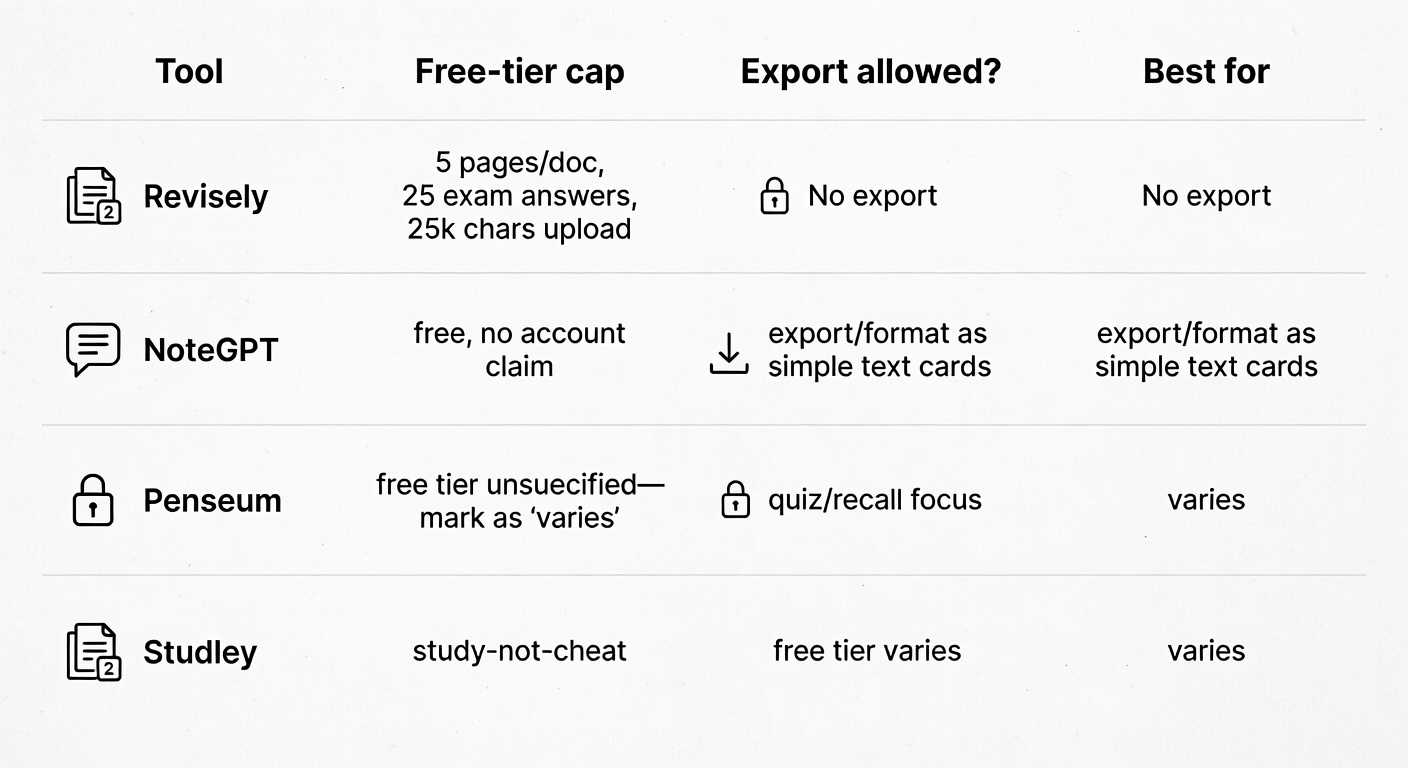
- Free tiers are real—but they’re usually capped by pages, chats, or exports. Revisely’s Basic plan limits you to 5 pages per document, 25 exam answers, 25,000 characters per text upload, plus no exporting on free (Revisely).
- “Study” tools work best when they generate quizzes/practice (active recall) rather than just summaries. Penseum explicitly frames itself around quizzes/recall and practice exams, not summary-only workflows (Penseum).
- Privacy is a spectrum. The blunt Reddit heuristic is basically: local models or assume your data is being hoovered (r/privacy thread).
- A simple 3-tool stack beats 12 random apps you never open. Students already mix tools (ChatGPT + Perplexity + NotebookLM, etc.) instead of hunting for one perfect app (r/ProductivityApps).
- Always verify outputs against your source materials—because the model is confident, and your professor is not impressed.
How to Choose a “Free” AI Tool (So You Don’t Get Paywalled Mid-Semester)

At first glance, “free AI tools for students” sounds like a solved problem. Then you upload Week 3’s readings and the app politely informs you that your free trial has “ended” (or worse, that it never really started).
Here’s what I check now—fast:
1) Free-tier ceilings: pages, chats, uploads, and “exam answers”
Revisely is refreshingly explicit: Basic is $0, but you get 5 pages per document upload and 25 exam mode answers (Revisely). That’s not “bad”—it’s just math. If your weekly PDFs are bigger than the cap, your “free” plan breaks on the first upload.
2) Export lock-in (the quietest paywall)
Some tools let you generate content for free, then charge you to export to Anki/PDF/CSV. Revisely’s Basic tier explicitly says No Exporting (Revisely). If your whole system lives in Anki, that matters more than fancy UI.
3) Is it built for recall—or just vibes?
Summaries feel productive. They’re also a trap: you can read five summaries and still blank on an exam question.
Study-first tools market themselves around practice. Penseum claims it emphasizes “questions, quizzes, and recall” (Penseum). Studley is even more direct with “We help you study. Not cheat.” (Studley).
4) “Free” can drift
A Reddit post praising a tool as free is a snapshot, not a contract. Students in the wild already hedge by mixing tools instead of betting everything on one app (r/ProductivityApps).
So my rule is boring: pick tools whose free limits match your weekly workload, not your optimism.
A Minimal Free Stack (3 Tools) That Covers 80% of Student Work
Most students I see aren’t using one magic app; they’re stitching together a small stack—ChatGPT for drafting, Perplexity for quick research, NotebookLM for “ask my notes” studying (r/ProductivityApps).
My minimal “free AI tools for students” stack looks like this:
- A general chatbot (explanations + first drafts)
- A study-first quiz generator (turn your materials into practice)
- A flashcard system (fast recall loops)
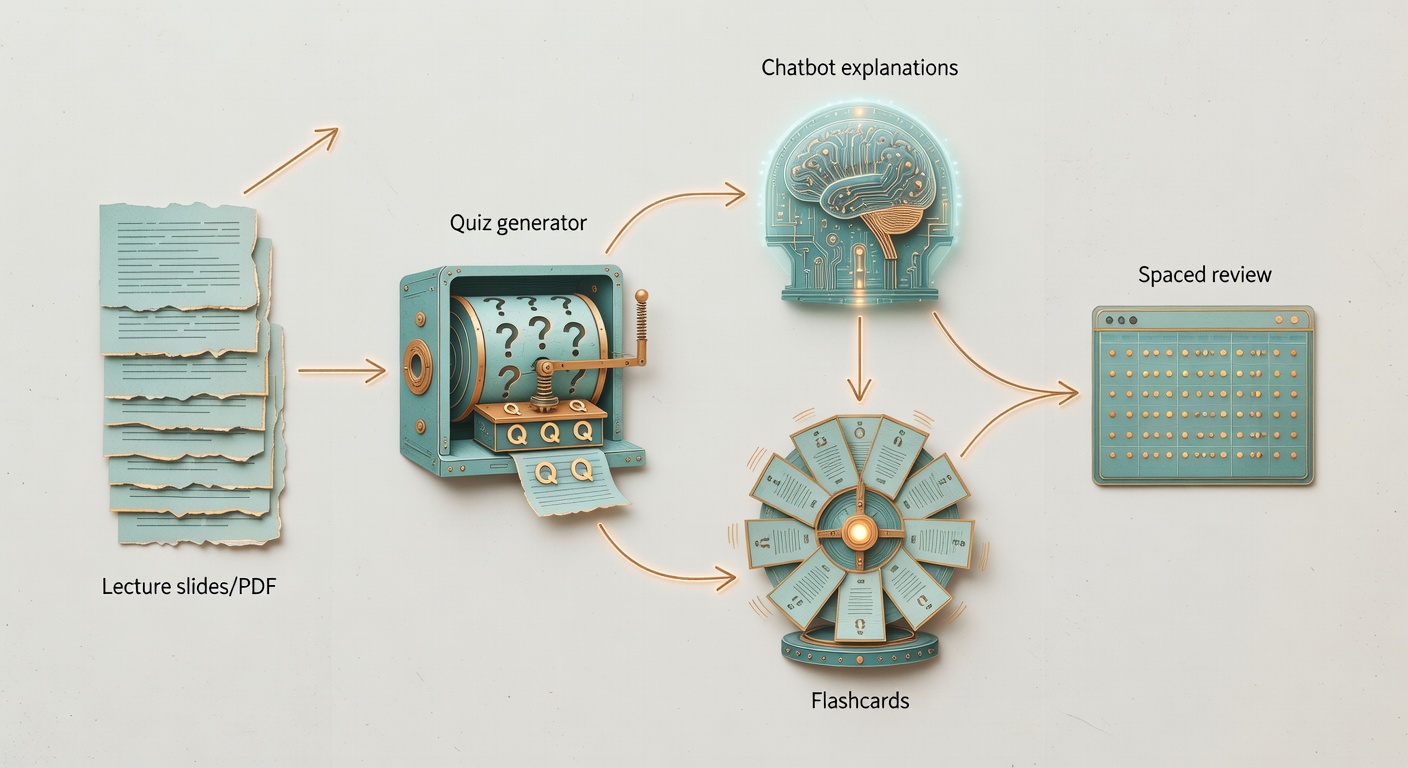
Workflow (slides → questions → spaced review):
- Generate a quiz set from your lecture text.
- Convert what you miss into flashcards.
- Use the chatbot to explain why you missed it—then re-answer without help.
Tool #1: A general chatbot (ChatGPT / Claude / Gemini) for explanations and first drafts
Students explicitly list ChatGPT, Claude, and Gemini as the generic apps they reach for (r/ProductivityApps).
Use it for:
- Breaking down concepts into steps
- Outlining a paper (structure, not final prose)
- Generating practice problems (then you solve them)
Don’t use it for:
- Final citations or factual claims without checking sources
- Anything you can’t defend in office hours
Verification habit: ask it to list assumptions and uncertainties, then cross-check against your notes.
Tool #2: A study-first app that generates quizzes (Penseum or Studley) instead of just summaries
The point of a study app isn’t to “explain” content; it’s to make you retrieve it on demand.
Penseum’s pitch: upload notes/PDFs, get “guides, flashcards, and quizzes,” with an emphasis on “questions, quizzes, and recall” (Penseum). Studley lists a similar pipeline—flashcards, smart quizzes, written tests, tutor flow—and frames it as “We help you study. Not cheat.” (Studley).
Try this instead of trusting marketing:
- Upload one lecture.
- Generate 20 questions.
- If too many are fluff, move on.
Tool #3: A flashcard generator for fast recall loops (NoteGPT vs Revisely free tiers)
Flashcards are where “free” gets weirdly concrete.
NoteGPT’s flashcard maker says: “It’s free with no account required” (NoteGPT). Revisely is explicit about the trade: free account, but Basic caps uploads and blocks exporting (Revisely).
Pick based on constraints:
- Need export? Check the free plan carefully (Revisely Basic won’t do it).
- Need no-login quick cards? NoteGPT is built for that claim.
- Working with big PDFs? Revisely Basic’s 5-page limit will bite early.
Tool Comparison Matrix (Free Tiers, Limits, and Best Use)
One annoying constraint: most “free tier” limits for big chatbots aren’t published in a clean, student-friendly table. Gemini is the exception in that Google at least documents plan limits—and also warns they can change (source). So below, I’m strict about sourcing: if I can’t cite a number, I won’t pretend I can.
1) General Chatbots (ChatGPT vs Claude vs Gemini)
| Tool | What it’s best at | Free-tier limits (specific) | Export (Anki/PDF/CSV) | Source-grounding / citations | Privacy posture | Gotcha / paywall trigger |
|---|---|---|---|---|---|---|
| ChatGPT | Drafting + explanations (per student usage patterns) | Not provided in this source pack (limits vary by plan and change) | Text copy/paste | Varies by mode; verify manually | Hosted | Long chats + file-heavy work tends to hit caps first (general pattern) |
| Claude | Drafting + explanations (per student usage patterns) | Not provided in this source pack | Text copy/paste | Varies; verify manually | Hosted | Free usage caps can appear mid-session (not quantified here) |
| Gemini (Basic / free) | General Q&A + drafting; integrates with Google workflows | No fixed public “messages/day”; limits “may change” and are distributed throughout the day (source). Users can hit “You’ve reached your capacity, try again later” (source). | Text copy/paste | Can link sources in some workflows; treat as auditable only when links are present | Hosted | Big uploads + long prompts burn capacity faster (source) |
2) Quiz Generators (Penseum vs Studley vs AnkiDecks as an alternative path)
| Tool | What it’s best at | Free-tier limits (specific) | Export (Anki/PDF/CSV) | Source-grounding / citations | Privacy posture | Gotcha / paywall trigger |
|---|---|---|---|---|---|---|
| Penseum | Study roadmap: guides + flashcards + quizzes + practice exams (source) | “Free to use; premium subscription available” (no hard caps published in this pack) (source) | Not specified here | Works from your uploads; still verify questions against notes | Hosted | Premium gating tends to show up when you want more volume/advanced modes |
| Studley | Quiz + tutor flow; “study, not cheat” positioning (source) | Not provided in this source pack | Not specified here | Depends on your uploads; audit by checking against originals | Hosted | If it generates “pretty” but shallow questions, it’s not doing the job |
| AnkiDecks (alternative) | Generate flashcards (and quizzes) from files; positioned around fast conversion (source) | Claims “Generate Flashcards Now – Free” but specific caps aren’t listed in this excerpt (source) | Exports “to Anki with a single click” (per product page) (source) | Not a citation tool; it’s a conversion tool | Hosted | Quality control: AI-generated cards can be noisy; you still edit |
3) Flashcard Tools (NoteGPT vs Revisely vs Anki)
| Tool | What it’s best at | Free-tier limits (specific) | Export (Anki/PDF/CSV) | Source-grounding / citations | Privacy posture | Gotcha / paywall trigger |
|---|---|---|---|---|---|---|
| NoteGPT | Quick flashcards without account friction | Claims “free with no account required” (source) | Not specified here | Not a citation tool | Hosted | If you can’t export cleanly, you’ll end up copy/pasting anyway |
| Revisely | Flashcards from small docs; explicit free constraints | 5 pages/document, 25 exam answers, 25,000 chars, No Exporting (source) | Export locked on free (source) | Not a citation tool | Hosted | The export lock is the whole game |
| Anki | Spaced repetition engine (the “boring but works” baseline) | No AI cap; your constraint is card creation workflow | Imports via CSV/text; formatting matters (source) | N/A | Local app | If you don’t standardize fields, imports get messy fast |
Choose Your Stack Based on Your Needs (Fast Rules)
These are the “don’t make my mistakes” rules—built around the constraints that actually show up mid-semester.
- If you read 50+ pages/week → avoid tools with hard page caps (like 5 pages/document on Revisely Basic) and either split PDFs into smaller chunks or use tools whose limits are based on capacity rather than pages (source, source).
- If you need to export to Anki → prioritize Anki-first workflows (import CSV/text) and avoid “no exporting” free tiers (Revisely Basic explicitly blocks exporting) (source, source).
- If privacy matters → go local (Ollama/LM Studio/llama.cpp are the names people keep repeating) and keep sensitive data out of hosted tools (source).
- If you need citations you can defend → use tools that show clickable sources for discovery, then move key passages into a notes-grounded workflow; treat anything without links as “maybe” until verified (source).
- If you keep hitting “capacity” messages → shorten prompts, reduce file size, and avoid heavy tools (Deep Research/video) when you’re close to the edge; Gemini’s free tier is explicitly dynamic and can throttle (source).
Copy/Paste Comparison Sheet (fill this in once, save yourself later)
| Tool | Weekly pages handled | Need Anki export? | Privacy level (Local/Hosted) | Notes (limits/paywalls) |
|---|---|---|---|---|
| Gemini (Basic) | __ | No | Hosted | Dynamic caps; “capacity” cooldowns (source) |
| Penseum | __ | Maybe | Hosted | Free + premium; recall-first pitch (source) |
| Revisely (Basic) | 5 pages/doc | No (locked) | Hosted | No exporting; 25 exam answers (source) |
| Anki | Unlimited | Yes | Local | Import via CSV/text; format carefully (source) |
30-Day AI Study Workflow (no downloads, just reps)
| Week | Goal | Checklist |
|---|---|---|
| Week 1 | Set up the stack + baseline |
☐ Pick 1 chatbot + 1 quiz tool + Anki ☐ Run one lecture through quiz generation ☐ Create first 30–60 cards from misses ☐ Record baseline quiz score: __% |
| Week 2 | Make recall a daily habit |
☐ 10–20 min Anki/day (no heroics) ☐ 2 quiz sessions/week from new material ☐ Turn every missed concept into 1–3 cards |
| Week 3 | Tighten quality control |
☐ Delete/merge low-quality cards ☐ Add “why” cards for common errors ☐ Re-quiz weak topics until stable |
| Week 4 | Exam rehearsal |
☐ Timed practice set (simulate constraints) ☐ Review only misses + near-misses ☐ Re-test 48 hours later (spaced check) |
Research Without Hallucinations: Use Tools That Show Sources (and Know When They Don’t)
“Research” is where LLMs get you in trouble fastest—because they can sound right while being wrong.
The pattern students describe is basically:
- Use a web tool for discovery and quick fact checks
- Move key passages into a notes/PDF-grounded tool for Q&A and practice
In the student stack thread, Perplexity is used for “quick search… and fact check the things ChatGPT gives me,” while NotebookLM is used when you have “the sources” and want questions/test prompts from your own materials (r/ProductivityApps).
Mini-checklist before trusting anything:
- Does it provide citation links I can click?
- Can it quote the exact passage it’s using?
- What would falsify this claim?
“Source-grounded” doesn’t mean “correct”; it means “auditable.”
Privacy and Student Data: Hosted AI vs Local Models (What’s Realistic on a Student Laptop)
A lot of “free AI tools for students” roundups ignore privacy until it’s a disaster.
The blunt r/privacy take is: “Only models run locally, the rest are data hoovering behemoths” (r/privacy). Overstated sometimes, but directionally right: local is the only strong privacy posture.
Pragmatic ladder:
- Local models (best privacy, most friction): people point to running models locally with tools like Ollama, LM Studio, llama.cpp (r/privacy).
- Typical hosted chat: assume prompts may be stored. Don’t paste sensitive student data, private grades, or anything you wouldn’t want screenshot.
There’s no easy answer—just tradeoffs you should make with your eyes open.
Using AI Without Cheating (and Without Outsourcing Your Brain)
I’m skeptical of anything that makes it too easy to skip the hard part.
Studley’s positioning is blunt: “We help you study. Not cheat.” (Studley). And in the student thread, the cultural pushback is plain: “I’d rather use my brain. No need for AI slop” (r/ProductivityApps).
My defensible line: use AI to generate practice and feedback, not to produce the final work you’re being assessed on.
Use cases that usually hold up:
- Generate practice questions from your notes, then answer without help
- Get feedback on structure (thesis clarity, paragraph order), then rewrite yourself
- Ask for concept explanations, then re-explain in your own words
- Build a study schedule, then do the reps
If a tool’s “free” plan nudges you toward copy/paste submission by making studying feel like a button-click, that’s a smell. Pick tools that force retrieval, not just reading.
Writing With AI (Without Getting Burned): A Student Workflow
This is the part that matters. Most “AI writing” advice is either moral panic or “just ask it to write the essay.” Neither helps when you’re staring at a blank doc at midnight.
Here’s a workflow that’s actually survivable:
- Research question → ask the chatbot to help you narrow scope, then you pick the final question.
- Outline → generate 2–3 outline options (different structures), then you choose one and edit it.
- Draft → write the first pass yourself (messy is fine). Use AI for paragraph-level rewrites only when you can explain the content.
- Revise → use AI as a critic: coherence, counterarguments, missing definitions, and “what would a skeptical grader poke at?”
- Citations → AI can suggest what to look for, but you must cite from the original sources you actually read. No exceptions.
Copy/paste prompts I’ve used (tweak to your class):
- Thesis refinement: “Here’s my draft thesis. Give me 3 stronger versions that are more specific, and list what evidence each version would require.”
- Counterargument check: “Argue against my thesis like a tough TA. Then suggest one concession paragraph that doesn’t collapse my argument.”
- Structure feedback: “Here’s my outline. Identify the weakest transition and propose a better ordering. Don’t add new claims.”
- Citation safety: “List claims in my draft that require citations. For each, tell me what kind of primary/secondary source would support it.”
Writing Safety Checklist (print this in your brain)
- ☐ Every factual claim has a source you personally opened (not “the model said”).
- ☐ No fabricated citations—if you can’t find it again, it doesn’t exist.
- ☐ Quotes match the original text word-for-word (and page/paragraph is correct).
- ☐ You can explain each paragraph out loud without looking at the screen.
- ☐ AI rewrites didn’t change meaning (common failure mode).
- ☐ You added at least one counterargument and a response (not a strawman).
- ☐ You kept version history (so you can prove authorship if needed).
- ☐ You followed your course policy on AI use/disclosure.
- ☐ Final pass is in your voice—awkward but honest beats polished and suspicious.
- ☐ Formatting is correct (citations, headings, references). Models are sloppy here.
Short Case Study: Organic Chemistry (What the Stack Looks Like in a Real Week)
Call her Sarah (not a real person; a template you can steal). She’s taking orgo, which is basically a weekly reminder that memorisation without practice is a lie.
Monday: She uploads lecture notes into a quiz-first tool (Penseum-style workflow: guides + flashcards + quizzes) and generates ~25 practice questions (source). She answers them cold, marks misses.
Tuesday–Thursday: Every miss becomes 1–3 Anki cards (definition, mechanism step, “why this reagent?”). She does 15 minutes/day of review. Short. Non-negotiable.
Friday: She asks a chatbot to explain the specific errors—then re-answers without help. If she can’t re-derive the mechanism, she adds a “why” card.
Weekend: Timed mixed quiz. Anything still shaky gets another loop.
How to replicate (copy this):
- ☐ Generate 20–40 questions/week from your own materials.
- ☐ Convert misses into cards within 24 hours.
- ☐ Review 10–20 minutes/day.
- ☐ Re-test weak topics 48 hours later (spaced check).
Reader-tracking template (example metrics — fill in your own)
FAQ: Free AI Tools for Students (2026)
What are the best free AI tools for studying in 2026?
A small stack beats a giant app folder: a general chatbot for explanations, a quiz-first tool for active recall (Penseum-style), and Anki for spaced repetition (source).
What’s the best free AI tool for writing essays?
Use a chatbot as a critic and structure helper (thesis, outline, counterarguments), not as the author. The “Writing Safety Checklist” above is the guardrail.
How do I avoid hallucinations when using AI for research?
Only trust claims you can audit: clickable sources, quoted passages, and originals you opened. If it can’t point to sources, treat it as a lead—not evidence.
Which free AI tools export to Anki?
Some tools lock export on free (Revisely Basic: No Exporting) (source). The most reliable path is generating a clean CSV/text format and importing into Anki—formatting matters (source).
What “free limits” matter most for students?
Three: (1) page/PDF caps (e.g., 5 pages/document), (2) export lock-in, and (3) dynamic chat capacity that throttles during heavy use (source, source).
Is Gemini actually free for students?
Gemini Basic exists without a Google AI plan, but Google explicitly warns limits “may change” and are distributed throughout the day (source). In other words: free, but not predictable.
Is Perplexity or NotebookLM better for research?
Students often use Perplexity for quick discovery/fact-checking and NotebookLM when they already have sources and want Q&A grounded in those materials (source).
How can I use AI without cheating?
Use it to generate practice, feedback, and explanations—then do the retrieval yourself. If you can’t defend the work in office hours, you’re borrowing trouble.
What’s the most privacy-safe option for AI study help?
Local models. r/privacy’s blunt take is that local is the only strong privacy posture; hosted tools require you to assume your prompts may be stored (source).
Sources
- College starts soon – what AI apps you like best? (r/ProductivityApps)
- AI Flashcard Generator (Revisely) — free plan limits
- AI Flashcard Maker (NoteGPT) — “free with no account required”
- Penseum — quizzes/recall positioning
- Penseum profile — free + premium positioning
- Studley AI — “We help you study. Not cheat.” + features
- Gemini Apps limits & upgrades (Google Help Center)
- Gemini Free limits and “capacity” behavior (DataStudios)
- What AI respects your privacy? (r/privacy) — local vs hosted discussion
- Anki CSV import advice thread (r/Anki)
- AnkiDecks — AI flashcard generator and Anki export claim