
AI Voice Cloning Tutorial (2026): Clone Your Voice Safely, Get Clean Audio, and Avoid the Usual Traps
I spent the last few days working through this concept and here’s what stuck. My first “clone” sounded like me—recorded in a reflective room with a laptop fan in the background. That was on me.
Executive TL;DR
- Default choice for most people: hosted TTS voice cloning (fast setup, predictable quality, fewer moving parts).
- Minimum clean-audio guidance: you can start with seconds, but consistent, noise-free minutes usually determine whether it sounds “usable” or “uncanny.”
- Consent and disclosure are non-negotiable: treat voice like sensitive personal data; for phone calls, rules can be strict (see FCC/TCPA note below).
- Go local/open-source when: you need privacy/control or offline processing; choose hosted when you need speed, support, and a higher quality ceiling.
Here’s the thesis: voice cloning quality is mostly recording hygiene + choosing the right cloning mode, and the ethical bar is higher than most tutorials admit.
I’ll keep this practical: how to pick TTS vs speech-to-speech, how much audio you actually need, how to record samples that don’t sabotage you, and how to ship something you can stand behind. We’ll also talk consent early—because the FCC has already made “AI-cloned voice robocalls without consent” a clear violation under the TCPA framework (MWE/FCC summary).
Key Takeaways
- Audio quality beats tooling. Clean, consistent recording is the biggest driver of realism.
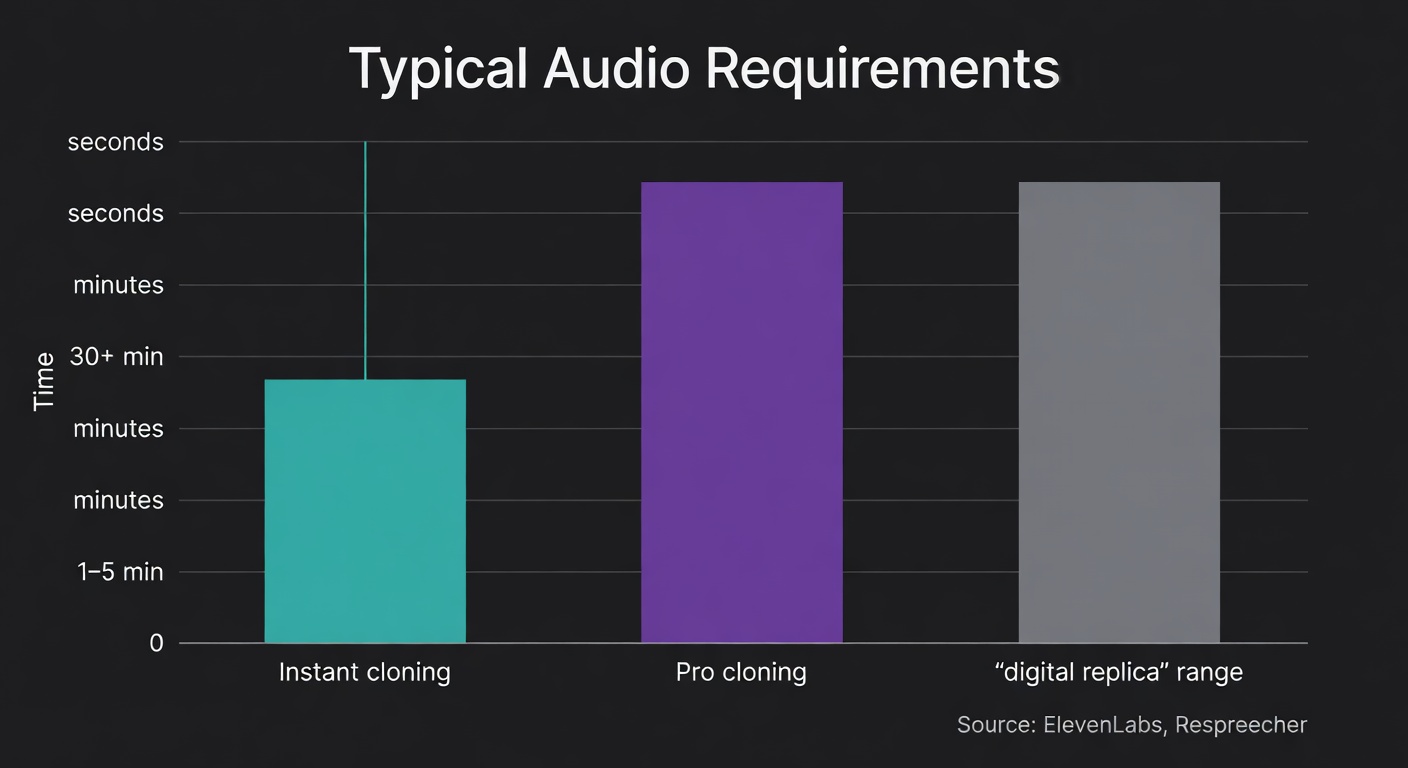
- Data needs vary by mode. ElevenLabs’ Instant Voice Cloning can start from ~10 seconds and generally uses 1–5 minutes; Professional Voice Cloning calls for 30+ minutes of clean audio (ElevenLabs).
- Costs and trade-offs are real: hosted tools charge subscription/usage; local tools are “free” in licensing but cost GPU time, setup, and ongoing maintenance (source).
- Time-to-results differs: hosted can be same-day; local can be same-day too, but only if your machine and dependencies cooperate.
- Local requires hardware planning: expect 8–16GB RAM minimum and a GPU for practical speed; CPU-only is possible but slow (estimates below; see Whisper VRAM reference for scale: ~1GB tiny to ~10GB large, source).
- Regional compliance matters: US phone outreach is constrained by TCPA/FCC; EU workflows should assume GDPR obligations around voice as personal/biometric-like data (source).
Before You Clone Anything: Consent, Disclosure, and the “Don’t Be That Person” Checklist
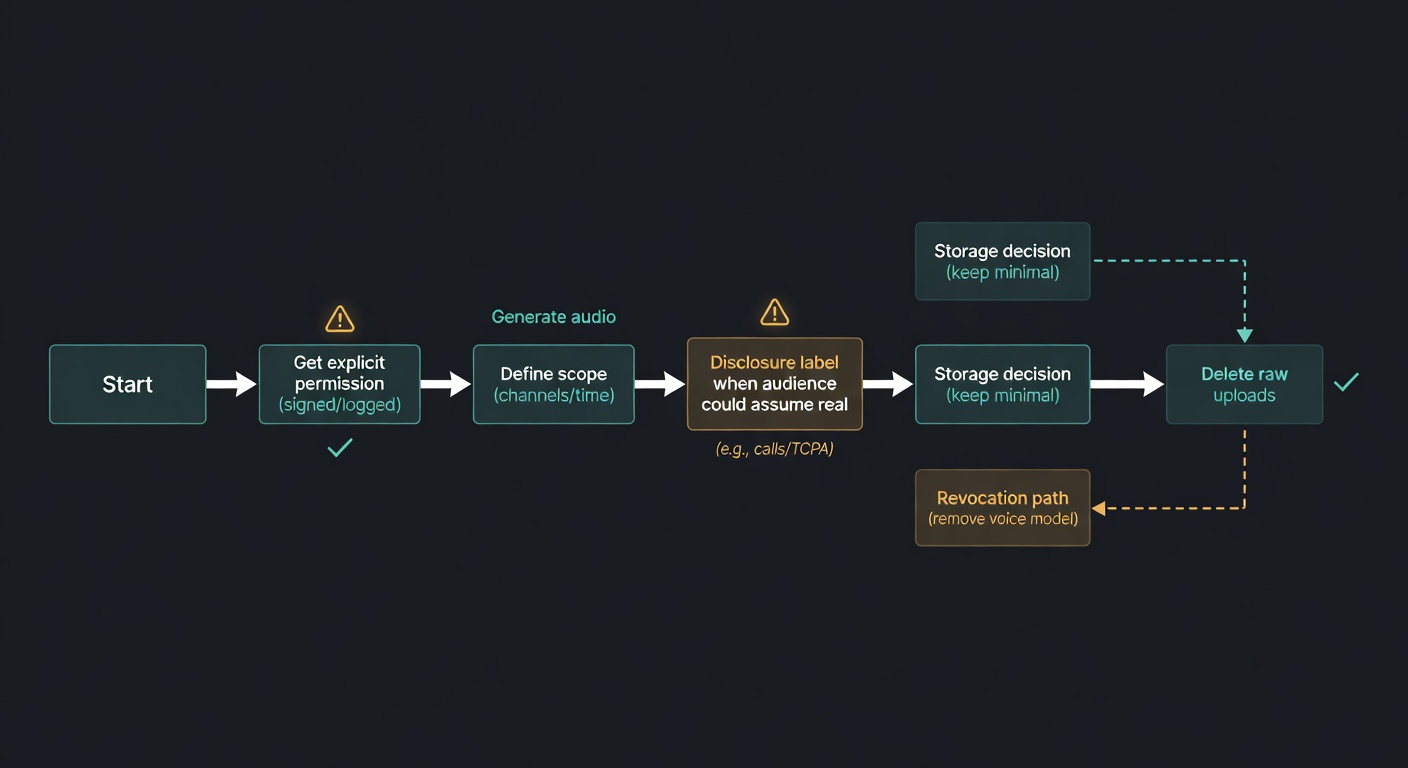
Voice functions like a biometric identifier in many real-world contexts, even when regulations vary by region. I treat consent like production access control: explicit, documented, scoped, and revocable.
Checklist:
- Get explicit permission from the voice owner. Written is best. Define scope (channels, duration, commercial use, revocation).
- Disclose synthetic audio when it changes expectations. If a reasonable listener would assume it’s live/real, label it.
- Keep a consent log. Who approved what, when, and for which outputs.
- Minimize retention. Store only what you need; delete raw uploads when you’re done.
- Avoid public-figure cloning. Even when technically feasible, it increases legal and reputational exposure.
- Adopt a “no phone calls” rule unless you can meet telecom compliance.
Regional compliance prompts (practical, not exhaustive)
- United States (calls/text outreach): The FCC treats AI-generated voices as “artificial” under the TCPA; robocalls using them are illegal without prior express consent, and artificial/prerecorded messages require identification/disclosure (MWE/FCC summary).
- European Union (GDPR): Voice can qualify as personal data and may be treated as biometric data when used for identification; plan for explicit consent where appropriate, data minimization, purpose limitation, security controls, and DPIAs for higher-risk processing (source).
- LATAM & Asia (what to check): ☐ local consent requirements for recording/processing voice ☐ impersonation/deepfake restrictions ☐ consumer protection and advertising disclosure rules ☐ telecom/robocall regulations if you touch phone systems ☐ cross-border data transfer constraints (especially if using hosted services).
Real-world scenario: sales outreach with AI voice
If a sales team wants AI-voiced outbound messages that “sound like the rep” and those messages touch phone calls, the FCC’s position is direct: AI-generated voices are “artificial” under the TCPA; robocalls using them are illegal without prior express consent, and artificial/prerecorded messages must include identification/disclosure info (MWE/FCC summary).
So the workflow changes:
- Opt-in consent before AI-voiced calls.
- Script includes an identification/disclosure line.
- Opt-out mechanism for telemarketing contexts (per TCPA rules discussed in the same FCC analysis).
- Internal policy: when AI voice is allowed—and when it is prohibited.
Use Cases Beyond Podcasts/Streaming (Accessibility, E-learning, Indie Games)
- Accessibility / voice banking: A user records a small, clean dataset so future TTS can speak in a familiar voice. Recommended approach: hosted TTS cloning for speed, or local if the recordings are sensitive. Risk/ethics note: treat voice samples as sensitive personal data; minimize retention and document consent (EU teams should assume GDPR obligations, source).
- E-learning narration updates: Course teams frequently patch a single sentence after a policy change or a typo fix. Recommended approach: TTS cloning for quick “pickups” without rebooking a narrator. Risk/ethics note: disclose synthetic narration where learners might assume a human recording, especially in assessments or compliance training.
- Indie game character voices: Small studios iterate dialogue constantly; voice cloning can keep a character consistent across rewrites. Recommended approach: hosted TTS for iteration speed; local if you need offline builds or want to avoid uploading unreleased scripts. Risk/ethics note: actor contracts should explicitly cover cloning scope and revocation.
- Localization without recasting: Preserve a speaker’s identity across languages for consistent branding. Recommended approach: multilingual TTS (hosted or local) depending on privacy constraints; Qwen3-TTS claims multilingual support and low-latency streaming (source). Risk/ethics note: avoid misleading audiences about who “said” the translated content; label synthetic dubbing when appropriate.
Mini Case Study: Measurable Results (One Workflow, Real Metrics)
Illustrative model (adaptable): An e-learning team ships weekly compliance modules. Baseline: 12 narration fixes/month, each requiring a 30-minute re-record session plus 45 minutes of editing/QA (≈15 hours/month). After switching to TTS voice cloning for pickups, they record a clean voice dataset once (2 hours) and handle each fix in ~20 minutes end-to-end (≈4 hours/month).
Result: ~11 hours/month saved after the initial setup. If internal fully-loaded cost is $80/hour, that’s ~$880/month. The calculation framework is simple: (baseline hours − new hours) × hourly cost − amortized setup time.
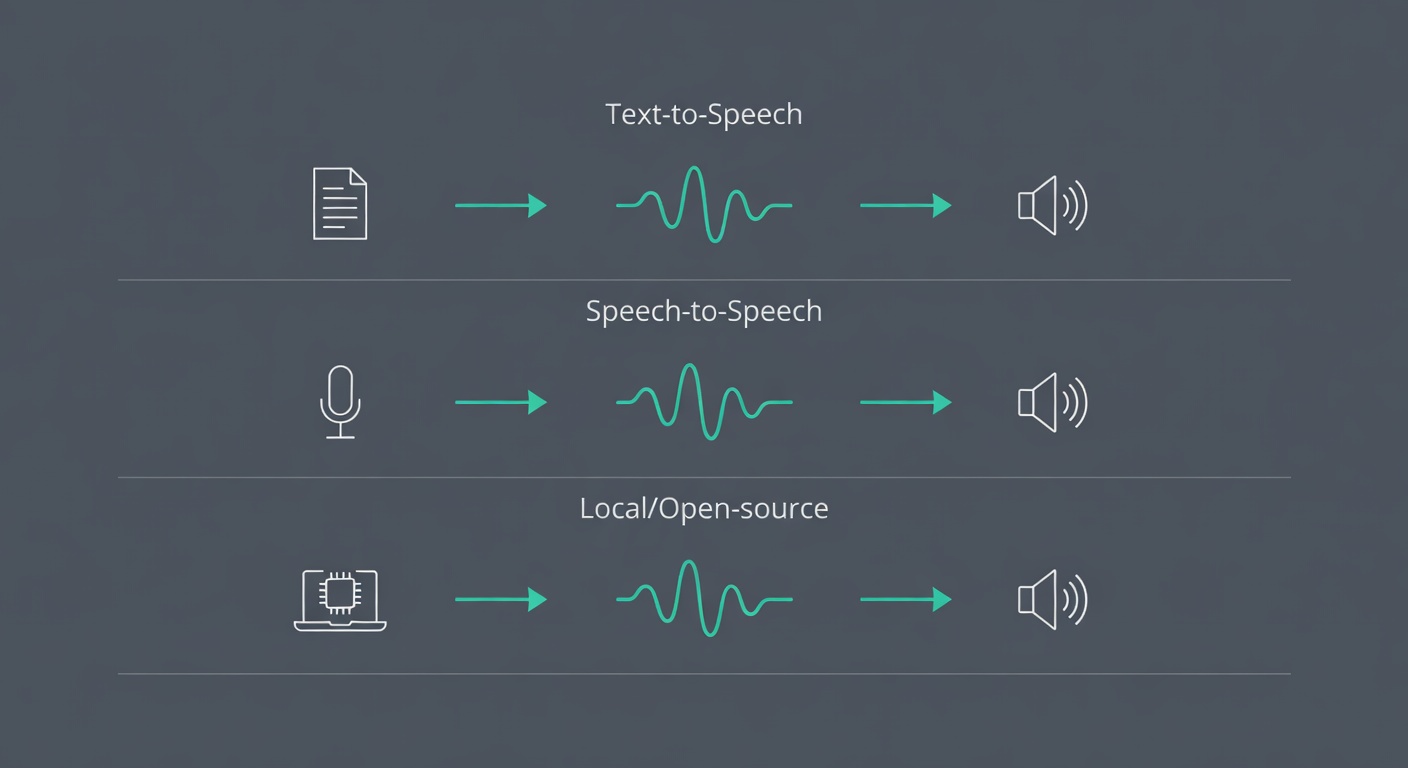
Pick Your Approach: Text-to-Speech Voice Cloning vs Speech-to-Speech (Voice Conversion) vs Open-Source Models
Most tutorials blur these together, and that is where people end up frustrated.
TTS voice cloning: type text → system reads it in the cloned voice. Strong fit for narration, patching podcast mistakes, localization, and accessibility voice banking.
Speech-to-speech: you speak → output comes out in the target voice, preserving performance (timing, emphasis). Respeecher distinguishes speech-to-speech from text-to-speech and focuses on preserving performance and accent (Respeecher).
Real-time voice conversion (RVC-style clients): low-latency conversion for streaming/voice chat, but training and model management become an ongoing operational task.
Open-source TTS/cloning: when you want local control or prefer not to upload voice data. OpenVoice is a common starting point; Qwen3-TTS is another option with an Apache 2.0 license (source).
Tool comparison (hosted vs local): what you gain, what you pay for
| Criteria | ElevenLabs | OpenVoice | Qwen3-TTS |
|---|---|---|---|
| Primary mode | Hosted TTS + voice cloning (plan-gated cloning features) (source) | Local/open-source voice cloning + style control (repo) (OpenVoice repo) | Local/open-source TTS + voice clone models; streaming supported; “97ms” latency claim on platform terms (source) |
| Quality ceiling | High for most creator workflows; improves with cleaner/more audio and higher tiers | Variable; depends on your setup, samples, and pipeline discipline | Potentially strong; model family supports instruction control and multilingual output (source) |
| Setup difficulty | Low (web/API) | Medium–high (dependencies, GPU drivers, reproducibility) | Medium–high (GPU strongly recommended; model downloads; optional FlashAttention) (source) |
| Privacy / data handling | Hosted: voice samples and text are uploaded to a third party | Local: you control storage and access (and you own the security burden) | Local: same benefits/risks as other self-hosted pipelines; Apache 2.0 model license (source) |
| Language support | Varies by model/features; check current product docs (source) | Multilingual support noted in repo (see project docs) (OpenVoice repo) | 10 major languages + dialectal profiles; 10+ languages and 9 Chinese dialects claim on platform terms (source) |
| Licensing / commercial use notes | Subscription terms; commercial rights depend on plan (source) | MIT license (repo) (OpenVoice repo) | Apache 2.0 license for the model repo (source) |
| Typical audio required | Instant: seconds to minutes; Pro: 30+ minutes clean audio (ElevenLabs) | Varies; expect better results with clean, representative samples (minutes, not seconds) | Model card describes “3-second rapid voice clone” capability for base models (source) |
| Best-fit use cases | Narration, pickups, dubbing, product voice, fast iteration | Sensitive data, offline workflows, research/prototyping, full control | Multilingual TTS, streaming scenarios, self-hosted pipelines, fine-tuning experiments |
Costs snapshot (free vs paid) (Pricing checked: Feb 2026)
| Tool | Free tier | Paid starting price | Usage-based costs | Hidden costs |
|---|---|---|---|---|
| ElevenLabs | $0/mo, 10k credits/mo (source) | Starter $5/mo (includes Instant Voice Cloning) (source) | Overages depend on plan/features; check current plan details (source) | Ongoing subscription management; vendor lock-in risk for long-lived projects |
| OpenVoice | OpenVoice repo) | N/A (software license is free) | None inherent; your compute is the meter | GPU time/electricity, setup time, maintenance, security hardening |
| Qwen3-TTS | Open-source model under Apache 2.0 (source) | N/A (model license is free) | None inherent; your compute is the meter | GPU time/electricity, storage for weights, dependency management; optional FlashAttention setup (source) |
How much audio do you actually need (and why the numbers vary)
The numbers vary because “acceptable quality” varies by use case.
- ElevenLabs: Instant Voice Cloning workable from a 10-second recording, generally 1–5 minutes; Professional Voice Cloning asks for 30+ minutes of clean audio (ElevenLabs).
- Respeecher: recording a digital replica typically takes two to thirty minutes, depending on desired quality (Respeecher).
More clean audio helps the model learn the hard parts: transitions, consonants, and your typical intonation patterns.
Hardware Requirements for Local Voice Cloning (What You Actually Need)
These are practical estimates. Local voice cloning is usually limited by GPU availability and memory, not by “AI complexity” in the abstract.
- Minimum (usable for experimentation): 8–16GB system RAM; 20–50GB free storage for environments + model weights; NVIDIA GPU strongly recommended.
- Recommended (less frustration): 32GB RAM; 8–12GB VRAM; SSD storage; stable CUDA drivers.
- VRAM guidance (rule of thumb): larger models and higher-quality settings increase VRAM pressure. For reference, Whisper’s published VRAM estimates range from ~1GB (tiny/base) to ~10GB (large) (source). TTS/cloning stacks can be comparable depending on architecture and batch size.
- CPU-only feasibility: possible, but expect slow iteration and higher friction; it is rarely practical for “try 20 prompts, tune, export” workflows.
Tool-specific notes:
- OpenVoice: plan for GPU use if you want reasonable turnaround; otherwise, treat it as a research/prototyping path (OpenVoice repo).
- Qwen3-TTS: the official model card recommends FlashAttention 2 to reduce GPU memory usage and improve performance; that implies you should plan for a CUDA-capable setup if you want smooth iteration (source).
Recording That Doesn’t Sabotage You: A Practical Audio Capture Checklist (Mic, Room, Script, Takes)
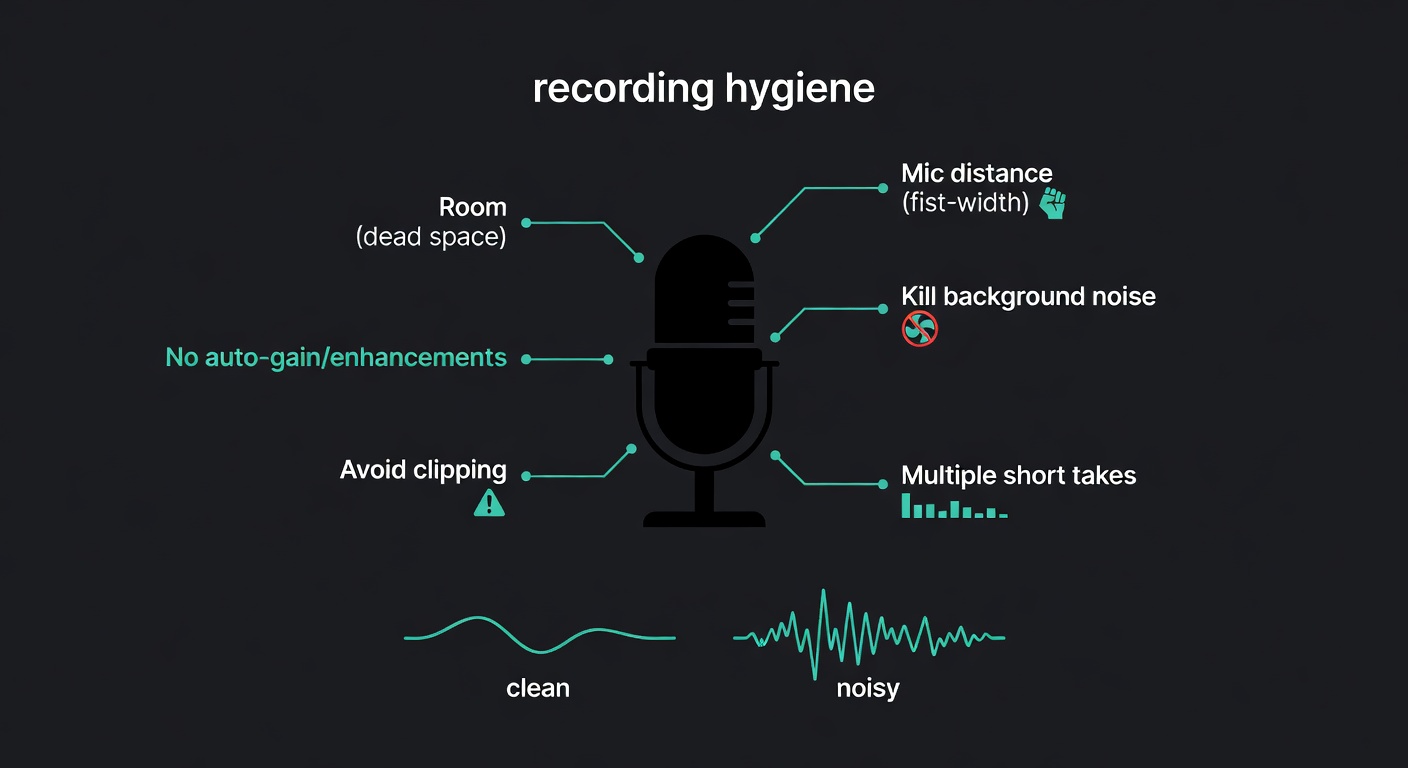
I recorded a sample next to a laptop fan; the clone learned the fan. Fixing it was mostly process and consistency.
Checklist:
- Room: pick the most acoustically “dead” space you have (closet/bedroom). Avoid kitchens and large rooms (reverb).
- Mic distance: keep it consistent (about a fist away). Avoid drifting.
- Disable auto-gain/“enhancements” if you can.
- Watch clipping: test, then check peaks.
- Script matters: use a prepared script with varied sounds; re-record until you’re satisfied (Amplemarket).
- Multiple short takes > one long take: easier to stay consistent and discard bad takes.
- Be natural: avoid “performing” unless that is what you want cloned.
- Eliminate background noise: otherwise the model may learn it as part of your voice signature.
ElevenLabs’ pro mode explicitly calls for clean audio (30+ minutes) (ElevenLabs). That requirement is a reliable indicator of common failure modes.
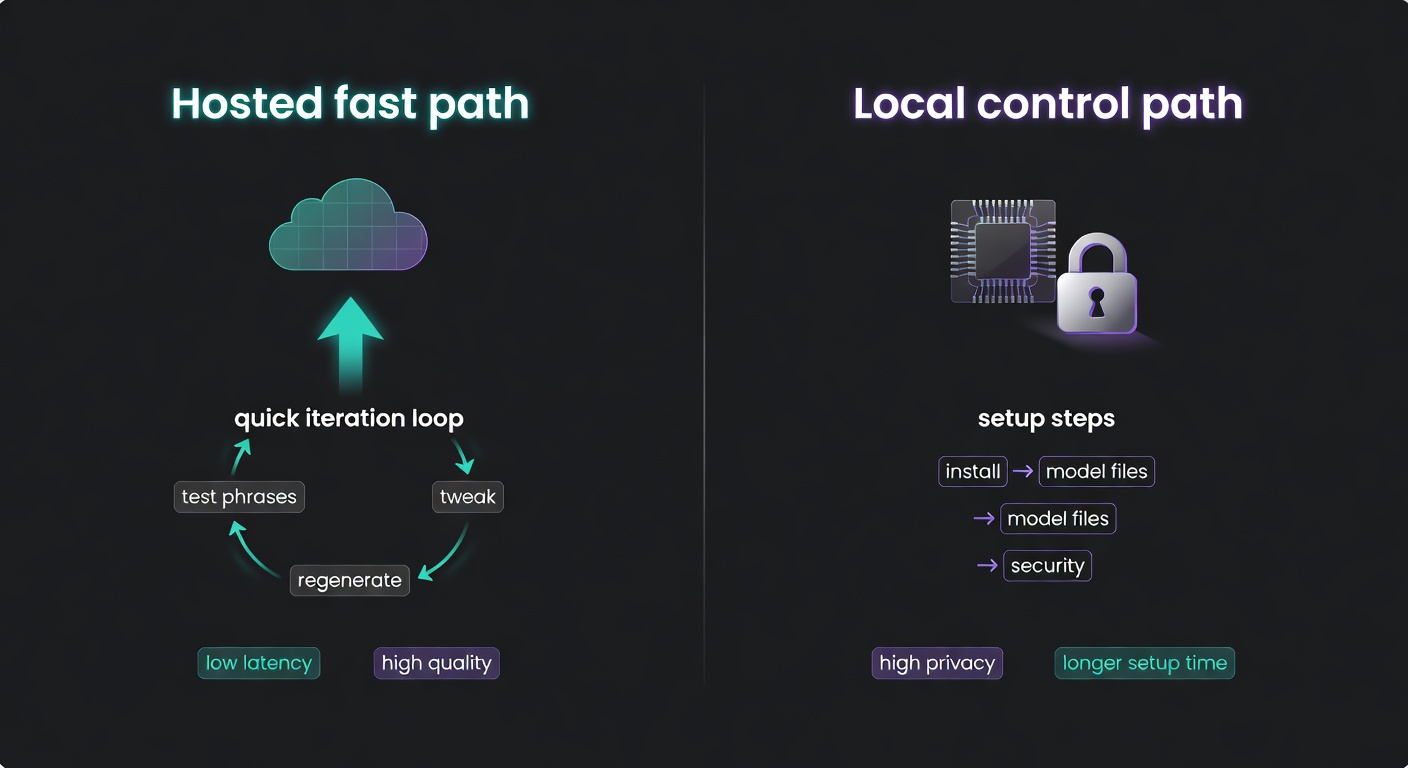
Step-by-Step: Clone Your Voice with a Hosted Tool (Fast Path) + Quality Tuning
The work is iteration and validation, not the initial button-click.
Generic hosted workflow:
- Choose a cloning mode (instant vs pro).
- Record/upload clean samples.
- Submit and wait.
- Generate test phrases.
- Tweak controls (pacing/energy/emotion where available).
- If artifacts persist, re-record (often faster than trying to “EQ your way out”).
- Export and integrate into your workflow.
Two pattern-match examples:
- Amplemarket’s flow: Settings → AI Voice Cloning → record using scripts → replay/re-record → submit → preview → integrate; you can replace the sample or delete voice cloning data (Amplemarket).
- ElevenLabs: Instant vs Professional Voice Cloning, plus delivery controls like pacing/energy/clarity/emotion (ElevenLabs).
My quick test script (catches edge cases)
- “My email is elliot.vance+test at example dot com.”
- “The total is $1,049.37—paid on 02/12/2026.”
- “I never said she stole the money.” (stress different words)
- “Six slick swans swam swiftly south.”
- “I’m sorry. I really am.”
If your clone cannot handle numbers and names, it is not ready for production content.
Troubleshooting the usual artifacts (robotic prosody, sibilance, weird pacing)
- Flat/robotic prosody: add more expressive samples; pro modes exist partly to capture nuance with more clean audio (ElevenLabs).
- Harsh “s” / sibilance: re-record slightly off-axis; consider a pop filter; avoid crowding the mic.
- Weird pacing: use pacing/energy controls if available (ElevenLabs).
- Accent drift: add more representative audio; remove outlier takes.
Fix the recording first; most issues improve materially before you touch any advanced settings.
Estimated Time: How Long Each Workflow Takes (Hosted vs Local)
These ranges assume you already know what “clean audio” means and you are not learning basic audio capture from scratch.
- Hosted instant cloning: 30–90 minutes end-to-end.
- Recording: 10–30 min
- Upload/training: 5–20 min
- Iteration/testing: 10–30 min
- Export/integration: 5–10 min
- Hosted professional cloning: 3–8 hours (often spread across a day).
- Recording: 60–120+ min (to reach clean 30+ minutes usable)
- Cleanup/culling: 30–120 min
- Upload/training: 30–180 min (varies by vendor queue)
- Iteration/testing: 30–90 min
- Local OpenVoice-style setup + run: 2–6 hours.
- Environment setup: 60–180 min
- Model downloads: 10–60 min
- First successful run + iteration: 30–120 min
- Local Qwen3-TTS setup + run: 2–6 hours.
- Environment setup: 60–180 min
- Model downloads: 10–60 min
- Optional performance tuning (FlashAttention, dtype, batching): 30–120 min (source)
What drives variance: audio cleanup effort, GPU availability, dependency conflicts, and how many iteration cycles you run before you accept the output.
Common Troubleshooting: Specific Problems → Specific Fixes
This is the section I wish more tutorials wrote. The pattern is consistent: diagnose the recording first, then the model/settings, then the integration.
| Problem | Likely diagnosis | Specific fixes |
|---|---|---|
| Background noise “baked in” | Fan/HVAC/traffic present in training samples | Re-record in a quieter room; remove noisy takes; keep mic distance consistent. Use light noise reduction only if it does not introduce artifacts—otherwise re-record. |
| Room reverb / “bathroom voice” | Reflective room; mic too far; untreated surfaces | Move to a smaller, softer room; record closer; hang blankets; avoid kitchens and large rooms. Re-record beats post-processing here. |
| Clipping / distortion | Input gain too high; peaks exceed 0 dBFS | Lower gain; do a level check; keep peaks safely below clipping. Discard clipped takes—models learn distortion as “voice texture.” |
| Plosives (“p” pops) | Air hitting mic capsule | Use a pop filter; angle mic slightly off-axis; increase distance slightly. Re-record the worst offenders. |
| Sibilance (harsh “s”) | Mic placement; bright mic; over-compression | Record off-axis; avoid aggressive processing; consider a de-esser in post for final output, but do not “fix” training data with heavy effects. |
| Robotic prosody | Training audio lacks expressive variation; mode too lightweight | Add expressive, clean samples; move from instant to pro mode if available (ElevenLabs); use pacing/energy/emotion controls where supported. |
| Mispronounced names/numbers | Tokenizer/lexicon gaps; ambiguous text formatting | Spell phonetically; add commas for pacing; test variants; for critical terms, consider recording a short “reference” clip and using speech-to-speech if your stack supports it. |
| Inconsistent loudness | Mixed mic distance; inconsistent gain; varied rooms | Standardize mic distance and levels; keep one room; normalize final exports (post), but keep training samples consistent rather than heavily processed. |
| Accent drift | Training set includes outliers; model defaults toward a more common accent | Curate samples to match target accent; remove outliers; add more representative audio; validate with a fixed test script. |
| Latency issues (real-time conversion) | Buffer too small; chunk size mismatch; slow pitch extraction | Increase CHUNK (e.g., 1024) and try F0 Det = dio; tune buffer vs processing time trade-off (RVC client tutorial). |
Going Local (When You Need Control): OpenVoice / Qwen3-TTS + Real-Time RVC Voice Conversion
Sometimes you need local control: sensitive recordings, offline workflows, or a desire to own the full pipeline.
Track 1: Open-source TTS/cloning (OpenVoice, Qwen3-TTS)
- OpenVoice: open-source voice cloning and style control via the project repository (OpenVoice repo).
- Qwen3-TTS: open-source TTS family released under Apache 2.0 (source), with platform terms claiming streaming speech generation with ultra-low latency (97ms) and multilingual support (10+ languages and 9 Chinese dialects) (source). Treat platform claims as claims; validate on your own hardware.
Practical advice: start with a known-good reference pipeline, then change one variable at a time (audio, model size, dtype, batch size). Local stacks punish “random tweaking.”
Track 2: Real-time conversion (RVC client)
For streaming/live conversion, the w-okada voice-changer client is a common entry point:
- Supports multiple VC models, focuses on RVC.
- Training must be done separately.
- First startup downloads assets and can take 1–2 minutes (RVC client tutorial).
Latency tuning knobs that matter:
- If choppy, increase CHUNK (e.g., 1024) and try F0 Det = dio (RVC client tutorial).
- Balance buf (buffer) vs res (processing time): too small stutters; too large feels delayed.
Which should you choose?
- Podcaster/editor: TTS cloning to patch mistakes and add lines without re-recording.
- Streamer/voice chat: real-time conversion, with the expectation of tuning and model management.
Local control does not reduce ethical obligations. Consent still applies.
Sources
- ElevenLabs — Voice Cloning (Instant vs Professional, audio requirements, controls)
- ElevenLabs — Pricing (tiers, credits, cloning feature gating)
- McDermott Will & Emery — FCC requires consent for AI-generated cloned voice calls (TCPA)
- Respeecher — Speech-to-speech vs text-to-speech distinction + ethics + recording time range
- OpenVoice GitHub — OpenVoice features + MIT license
- Qwen3-TTS — Apache 2.0 license
- Qwen3-TTS.org — Terms (97ms latency and multilingual support claims; effective date 2/12/2026)
- Hugging Face — Qwen3-TTS model card (languages, streaming, usage notes)
- OpenAI Whisper — VRAM requirement estimates (reference point for local model sizing)
- GDPR Register — Biometric data and GDPR considerations
- w-okada voice-changer — Real-time RVC client tutorial (CHUNK/F0 tips, startup notes)
FAQ: Voice Cloning (Monetization, Languages, Safety, and Limits)
Can I monetize cloned content?
Sometimes. It depends on the tool’s plan/terms and whether you have rights to the underlying voice. For hosted tools, commercial rights can be plan-dependent (source). For local open-source models, the software license may allow commercial use, but you still need consent and rights to the voice and content.
Does it work in Spanish?
Often, yes—depending on the model. Qwen3-TTS describes support for Spanish among its 10 major languages (source). For hosted tools, confirm current language support in product docs (source).
How much audio do I need?
For hosted cloning, you can start with seconds, but quality usually improves with minutes. ElevenLabs cites ~10 seconds to start and typically 1–5 minutes for Instant Voice Cloning, and 30+ minutes of clean audio for Professional Voice Cloning (ElevenLabs).
Can I clone someone else’s voice?
Only with explicit permission from the voice owner (and ideally a written scope). Without consent, you are taking on avoidable ethical and legal risk.
How do I disclose synthetic audio?
Use clear labeling where a listener might reasonably assume the audio is a real recording (e.g., “Synthetic voice generated with AI” in descriptions, intros, or captions). For regulated contexts like phone outreach, disclosure and identification requirements can apply (MWE/FCC summary).
Can I use it for phone calls?
Be cautious. In the US, the FCC treats AI-generated voices as “artificial” under the TCPA; robocalls using them are illegal without prior express consent, and artificial/prerecorded messages require identification/disclosure (MWE/FCC summary).
What should I delete when I’m done?
Delete raw voice recordings you no longer need, intermediate exports, and any uploaded samples stored in third-party dashboards when feasible. Keep only what you need for the agreed scope, and retain a consent log (not the audio itself) for auditability.